

By default the Forgejo runners usually need access to the Docker socket to be able to run actions in containers. It’s also possible to do this with rootless Podman containers but needs to be configured this way.
Prerequisites#
Create a user in which the runner will be installed.
adduser podman_runnerEnable the user to run systemd Services even when not logged in.
loginctl enable-linger podman_runnerInstall the runner#
Login as the new user and install the Forgejo runner.
export ARCH=$(uname -m | sed 's/x86_64/amd64/;s/aarch64/arm64/')
export RUNNER_VERSION=$(curl -X 'GET' https://data.forgejo.org/api/v1/repos/forgejo/runner/releases/latest | jq .name -r | cut -c 2-)
export FORGEJO_URL="https://code.forgejo.org/forgejo/runner/releases/download/v${RUNNER_VERSION}/forgejo-runner-${RUNNER_VERSION}-linux-${ARCH}"
wget -O forgejo-runner ${FORGEJO_URL} || curl -o forgejo-runner ${FORGEJO_URL}
chmod +x forgejo-runner
wget -O forgejo-runner.asc ${FORGEJO_URL}.asc || curl -o forgejo-runner.asc ${FORGEJO_URL}.asc
gpg --keyserver hkps://keys.openpgp.org --recv EB114F5E6C0DC2BCDD183550A4B61A2DC5923710
gpg --verify forgejo-runner.asc forgejo-runner && echo "✓ Verified" || echo "✗ Failed"cp /home/podman_runner/forgejo-runner /usr/local/bin/forgejo-runnerTest if the runner is executable
forgejo_runner -vIt should output a version number.
Register the runner#
For the runner to be usable it needs to be registered with the Forgejo instance first. This will create a .runner file in the current directory (userhome)
First a runer token needs to be obtained in the admin settings of Forgejo or in your repository or organization, depending on what the runner should be used for. The creation of the token directly in the admin settings creates a globally useable runner.
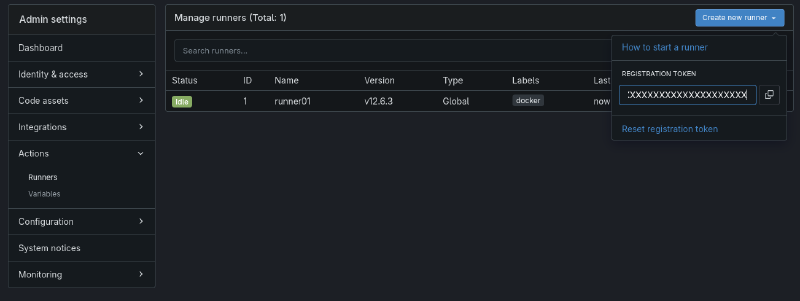
forgejo-runner registerforgejo-runner register
INFO Registering runner, arch=amd64, os=linux, version=v12.6.3.
WARN Runner in user-mode.
INFO Enter the Forgejo instance URL (for example, https://next.forgejo.org/):
https://git.example.com
INFO Enter the runner token:
XXXXXXXXXXXXXXXXXXXXXXXXXXXXXXXXXXXXXXXXXXXX
INFO Enter the runner name (if set empty, use hostname: gitserver):
runner01
INFO Enter the runner labels, leave blank to use the default labels (comma-separated, for example, ubuntu-20.04:docker://node:20-bookworm,ubuntu-18.04:docker://node:20-bookworm):
INFO Registering runner, name=runner01, instance=https://git.example.com, labels=[docker:docker://data.forgejo.org/oci/node:lts].
DEBU Successfully pinged the Forgejo instance server
INFO Runner registered successfully. The runner should now show up in the Forgejo admin settings

Create and enable Systemd Service#
Enable the Podman socket for the runner user.
systemctl --user enable --now podman.socketCreate the default runner configuration file.
forgejo-runner generate-config > config.yamlTo set host networking change the following in the generated config.yaml file.
network: "host"Now create the file /etc/systemd/system/forgejo-runner.service with the following content:
[Unit]
Description=Forgejo Runner
Documentation=https://forgejo.org/docs/latest/admin/actions/

[Service]
Environment=DOCKER_HOST=unix:///run/user/<USERID>/podman/podman.sock
ExecStart=/usr/local/bin/forgejo-runner daemon --config /home/podman_runner/config.yaml
ExecReload=/bin/kill -s HUP $MAINPID

# This user and working directory must already exist
User=podman_runner
WorkingDirectory=/home/podman_runner
Restart=on-failure
TimeoutSec=0
RestartSec=10

[Install]
WantedBy=multi-user.target
Reload the Systemd daemon and start the service
systemctl daemon-reload
systemctl start forgejo-runner.service
Check the status of the service
systemctl status forgejo-runner.serviceIf everything works correctly, enable the service that it starts automatically.
systemctl enable forgejo-runner.service