

After creating my blog and the git action to automatically deploy my changes to the live website there was one thing missing for me and that’s an integration with Obsidian. I use it for all my note taking and I really like it. There are lots of useful features and community plugins for it.
Since Obsidian also relies on Markdown it should be fairly easy to upload content from my notes to my blog.
Here’s a few requirements that I had in mind.
- Use my main vault but only publish what’s explicitly for the blog
- Sync the changes in Obsidian to my Hugo project with the press of a button (or running a script) ideally directly within Obsidian
- Make it easier to push changes to my repository directly via Obsidian as well
Whilst searching for ideas I stumbled upon NetworkChuck’s video about this.
And also his blog post I also found another blog post from 4rkal
I think I can get something nice up and running by combining the ideas of these two.
Preparation#
I created a folder called “Blog” in my Obsidian vault and copied the content of my Hugo content directory into it. This way I can edit blog posts as well as my other static sites.

It’s important that every post is called index in Obsidian, otherwise Hugo will not read it. To have the correct structure for metadata like tags etc. I created an Obsidian template.
---
title: "Blogpost"
date: 2026-02-10
draft: false
tags: ["automation", "obsidian", "hugo", "git"]
---
Copy Blog Posts to Hugo Repository#
I used the original script from NetworkChucks blog and simplified it for my needs. I saved this directly in my Hugo repository
The script will differentially copy the newly created or changed content from my Obsidian vault to my repository using rsync.
#!/bin/bash

# Original script from NetworkChuck: https://blog.networkchuck.com/posts/my-insane-blog-pipeline/

set -euo pipefail

# Set variables for Obsidian to Hugo copy
sourcePath="/home/mbaehler/Documents/Obsidian/Marco/Blog/"
destinationPath="/home/mbaehler/Documents/git/mbaehler.ch/content"

# Check for required commands
for cmd in git rsync; do
    if ! command -v $cmd &> /dev/null; then
        echo "$cmd is not installed or not in PATH."
        exit 1
    fi
done

# Sync posts from Obsidian to Hugo content folder using rsync
echo "Syncing posts from Obsidian..."

if [ ! -d "$sourcePath" ]; then
    echo "Source path does not exist: $sourcePath"
    exit 1
fi

if [ ! -d "$destinationPath" ]; then
    echo "Destination path does not exist: $destinationPath"
    exit 1
fi

rsync -av --delete "$sourcePath" "$destinationPath"

echo "All done!"
Commit & Push Script#
The following script also lives in my repository and adds my changes, commits them and pushes to the main branch.
It needs to be run directly from Obsidian to include the correct commit message. More on this in the next chapter. I’ve gotten the inspiration from 4rkal’s blog. Thank you!
#!/bin/bash
cd /home/mbaehler/Documents/git/mbaehler.ch

git add .
git commit -m "chore: update blog via obsidian"
git push
Running the Scripts from Obsidian#
I’ve installed the shellcommands plugin to run the scripts from inside Obsidian. In the plugin settings I configured two scripts.
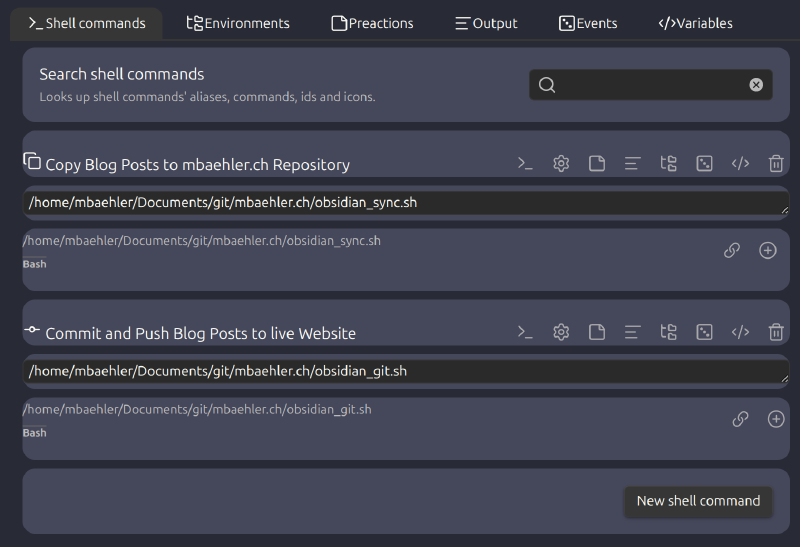
Now I can run the commands using Ctrl+P inside Obsidian and my changes will be pushed to my website.